Is Apple's HomeView a Game Changer for the Smart Home?
AI-generated, human-reviewed.
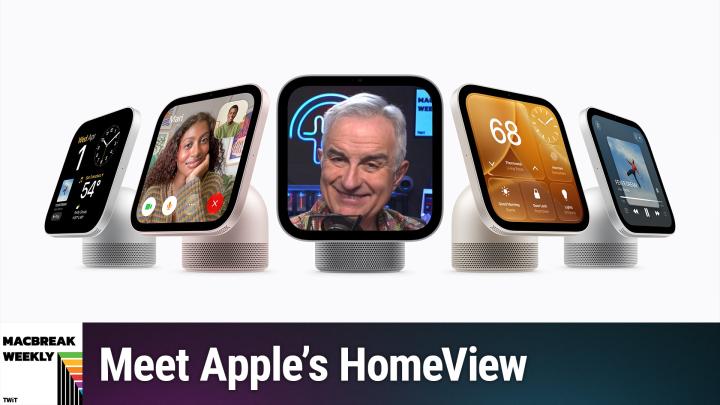
Apple’s HomeView, a $299 smart display announced this week, is designed as a central hub for your smart home and personal assistant needs. On MacBreak Weekly, the panel dissected its features, price, and how it stacks up against competitors like Amazon Alexa and Google Nest Hub—providing clear, actionable takeaways for anyone considering this device.
What Is Apple HomeView and Who Is It For?
Apple HomeView is Apple’s new 7-inch square smart display, intended to serve as a household hub for information, family organization, and smart device control. It’s positioned to replace devices like the kitchen tablet or the sticky note calendar on the fridge, bringing together functions like personal schedules, reminders, FaceTime, music, and smart home control in one always-on location.
The HomeView stands out for its multi-user support—a feature often missing from Apple’s mobile devices. Up to six family members can have personalized profiles, with the device adapting content as each person approaches. Authentication combines facial recognition (not full Face ID), voice, and proximity to a recently unlocked iPhone or iPad.
Apple HomeView Features and User Experience
On MacBreak Weekly, hosts highlighted several key features:
- 7-inch Liquid Retina display designed for tabletop or wall mounting (mount sold separately).
- Built-in Siri AI for voice commands, smart home control, and personalized information.
- FaceTime support using the built-in 12-megapixel camera with Center Stage (which follows you during calls).
- Integration with Apple ecosystem: Access to Photos, Messages, Music, Podcasts, Calendar, and more.
- Smart home dashboard: Control HomeKit-compatible lights, locks, thermostats, cameras, and more.
The HomeView does not swivel automatically (as rumored), but Apple is reportedly working on a future model with a robotic arm feature. Customization is intentionally limited—there’s no App Store for HomeView, but some third-party media apps like Spotify are supported, mainly through integrations similar to CarPlay.
How Does HomeView Compare to Other Smart Displays?
Value for Price: At $299, HomeView is priced significantly higher than Amazon Echo Show or Google Nest Hub displays. The MacBreak Weekly panel noted that, while it’s better designed and more privacy-focused than competitors, it’s not a budget device—Apple is targeting users deep in its ecosystem who prioritize design, privacy, and multi-user features.
Personalization: The device’s approach to handling multiple users sets it apart. Unlike many Apple products, HomeView can “switch” between family members and only shows relevant calendars, messages, and reminders for whoever is present. This addresses a long-standing complaint with iPads and HomePods, which lack robust multi-user functionality.
Privacy: Apple emphasizes end-to-end encryption and a secure enclave for both video and audio data. HomeKit Secure Video is another highlight, especially for users wary of third-party camera privacy policies.
Limitations:
- No true Face ID, so authentication is less seamless than on flagship iPhones or iPads.
- No app store, limiting extensibility; personalization largely depends on the Apple ecosystem.
- Wall mount and mounting accessories cost extra; multi-room setups become expensive.
- Smart home controls assume you use HomeKit-supported accessories; broader compatibility may require additional effort.
What Else Did Apple Announce for the Smart Home?
The HomeView launch is supported by a new home collection featuring LG, Schneider Electric, and others. Accessories include wall mounts, smart locks, thermostats, and cameras that pair easily with Apple’s Home app. The focus is on easy setup, privacy, and seamless integration, with services like HomeKit Secure Video and ultra-wideband smart locks for hands-free unlocking.
Key Takeaways
- Apple HomeView is a premium smart display ($299) aimed at families in the Apple ecosystem.
- Key differentiator: Multi-user support with tailored content and authentication.
- Works with HomeKit-compatible accessories for centralized smart home control.
- Lacks an app store—Apple keeps the experience curated and secure.
- Requires an iPhone or iPad to access fully personalized features.
- Accessories (mounts, etc.) are extra, raising total cost for wall or multi-room installations.
- Privacy and security are priorities: Data is end-to-end encrypted, and video streams are stored in iCloud, not third-party servers.
- Competes with Amazon and Google smart displays but at a higher price and with deeper Apple integration.
The Bottom Line
Apple’s HomeView is a well-designed, privacy-focused smart display that finally brings true multi-user support to an Apple device—but at a premium price that most benefits households already committed to the Apple ecosystem. If you’re an Apple family looking for a central hub that works well with HomeKit and want better privacy than what Amazon or Google offer, HomeView may be worth the investment. But those seeking affordable, highly customizable smart displays should look elsewhere.
For more insights and analysis on Apple’s latest products, listen to the full episode of MacBreak Weekly:
https://twit.tv/shows/macbreak-weekly/episodes/1046